
How do I manage a slideshow?
To begin, select Slideshows under Web Page Management.

To add slides to a slideshow, click the Manage button for the desired slideshow. A message will appear informing you that there aren't any slides yet. Press the 'Add Slides' button in order to add images to the slideshow that you created. When uploading slides you will have to fill out the following form:
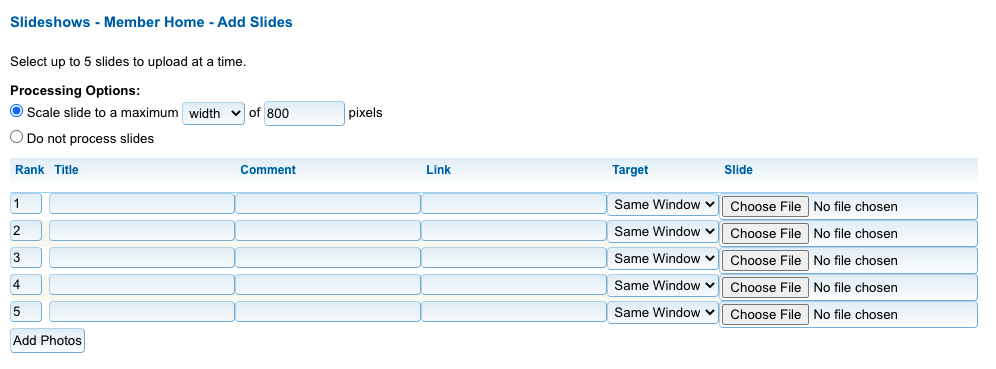
- Processing Options: Choose specific scaling settings for this slide.
- Rank: Use the rank to determine the order of the slides (lowest to highest number).
- Title: Enter the slide title if you wish to have it displayed with the slide. For an example see our demo site's member home (go to the sign in and the username and password are already entered for you).
- Comment: Enter a comment for the slide if you wish to have it displayed. See above for a link to an example.
- Link: If you wish to have this slide link to a web page, enter the URL.
- Target: Choose the target for the link.
- Slide: Select the image you wish to use from your file system.
You may add up to five slides at a time. When you are done press "Add Slide".
After uploading your slides you will have access to a list of your images that are contained in the slideshow.
There are Edit and Delete options if you need to make adjustments to the slides in your slideshow. You may also click on "View" to see the slide in another window.
When you edit a slide, you will notice that the editing fields are in a different order than when you uploaded them. There are also two additional editing options available:
- Pause Time: Set an individual pause time for the slide.
- Scale Mode: Choose the Scale Mode.
When you have finished editing your slide, click on "Update Photo" to save the changes.